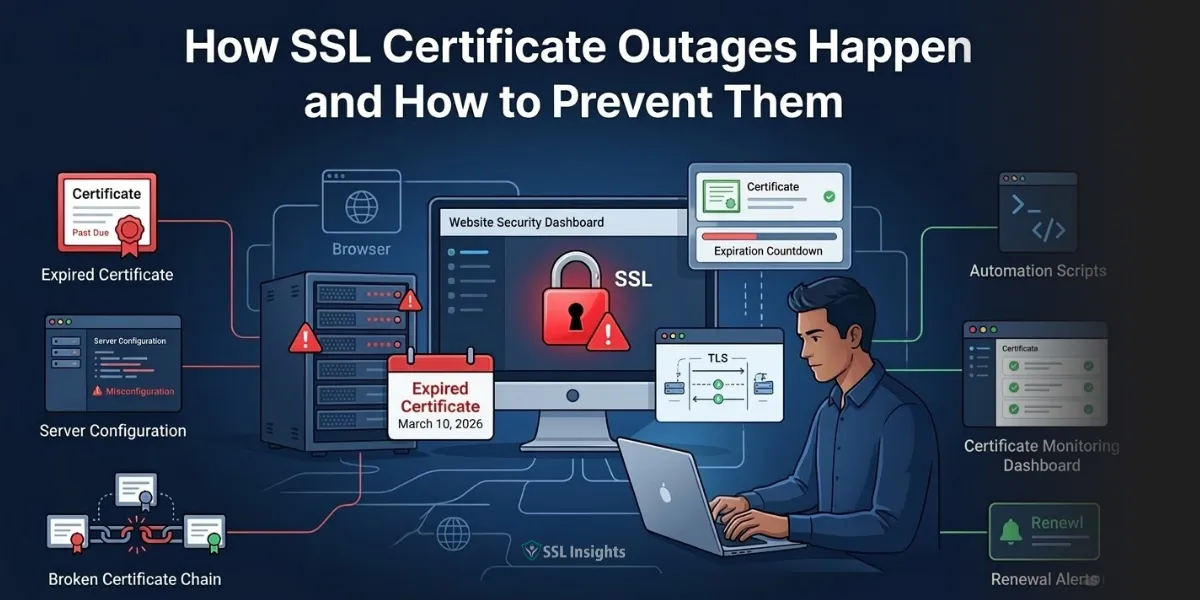
SSL certificate outages occur when a browser cannot verify a site’s TLS/SSL certificate, causing it to block access and display a security warning instead. The certificate may have expired, been misconfigured, revoked, or installed with an incomplete chain. When any of those conditions exist, the secure connection fails – and your site goes down. Microsoft Teams, Google Voice, Spotify, and Alaska Airlines have all suffered certificate-related outages in recent years. Each incident was preventable. Understanding the specific failure modes, and building a system that catches them before they catch you, is the only way to keep your services online.
What Is an SSL Certificate Outage?
An SSL certificate outage is a service disruption caused by an invalid, expired, or misconfigured TLS/SSL certificate that prevents browsers and clients from establishing a trusted HTTPS connection. When the certificate fails validation, browsers do not simply display a degraded experience – they block access entirely, showing warnings that most users will not bypass. The result is effective downtime even if your server is running perfectly.
What Causes SSL Certificate Outages?
SSL certificate outages have five primary causes, and most organizations will encounter more than one over time.
- Expiration is the most frequent trigger. A certificate has a defined validity window, and once that window closes, every browser and client immediately rejects the connection. No grace period exists. Expiration causes outages at companies of every size because teams rely on manual processes – email reminders, calendar entries, spreadsheet trackers – that break down under staff turnover, competing priorities, or simple human error.
- Misconfiguration happens during deployment. A certificate installed on the wrong server, bound to the wrong IP, or missing the intermediate CA bundle will fail validation even though it is technically valid. This type of outage often surfaces immediately after a deployment change.
- Domain name mismatch occurs when the certificate’s Common Name or Subject Alternative Names do not match the domain the user is actually visiting. A certificate issued for com does not automatically cover www.example.com, and a certificate scoped to the primary domain will fail on subdomains unless a wildcard or multi-domain certificate is in place.
- Certificate revocation happens when a Certificate Authority invalidates a certificate before its expiry, typically after a private key compromise or a policy violation. Browsers check revocation status, and a revoked certificate triggers the same hard block as an expired one.
- Incomplete certificate chains represent a subtler failure mode. The certificate itself may be valid and current, but if the intermediate CA certificate is missing from the server configuration, many devices – particularly mobile clients and embedded systems – will fail to verify the chain of trust and refuse the connection.
Comparison of Common Certificate Failure Types
The table below compares these failure types across their key characteristics.
| Failure Type | Typical Trigger | Detection Difficulty | Recovery Speed |
| Expiration | Missed renewal window | Easy – date is known | Minutes with automation |
| Misconfiguration | Deployment error | Moderate | Minutes if caught quickly |
| Domain mismatch | Scope oversight | Moderate | Requires reissuance |
| Revocation | Key compromise or CA policy | Hard – often unexpected | Hours to days |
| Incomplete chain | Deployment error | Hard – device-dependent | Minutes with correct bundle |
When your team has mapped which failure types apply to your environment, the next step is understanding how much each one actually costs.
How Much Do Certificate Outages Actually Cost?
Certificate-related outages are expensive far beyond the direct revenue loss of the downtime window itself. The Equifax data breach provides a clear example of the cascading damage possible when certificates go unmanaged. Investigators found that an expired certificate on a network monitoring device had gone undetected for 19 months, effectively blinding the security tool and allowing attackers to exfiltrate data from 48 databases undetected. The direct financial consequences ran into hundreds of millions of dollars in settlements and remediation costs.
For organizations without a public breach or headline outage, the costs are still real. Engineering teams pivot away from planned work to diagnose and fix the failure. Customer support volumes spike. SEO rankings can take weeks to recover. For e-commerce operations, every minute of downtime during peak hours directly removes revenue.
The scale of risk is growing. The CA/Browser Forum approved CA/B Forum Ballot SC-081v3 in April 2025, setting a phased schedule to reduce the maximum TLS certificate validity period from 398 days to 47 days by March 15, 2029, according to the CA/Browser Forum ballot record (April 2025). Organizations currently managing 1,000 certificates will go from roughly 1,000 renewal operations per year to over 7,700. Manual processes that barely hold together under today’s cadence will fail completely under that load.
How Do Real-World Outages Happen at Large Organizations?
The pattern that underlies most major SSL outages is a gap between organizational complexity and certificate visibility. Large enterprises run hundreds or thousands of certificates across domains, subdomains, load balancers, APIs, microservices, and internal tools. No single person has a complete picture.
When Microsoft Teams went down in 2020 for several hours, the root cause was an expired authentication certificate. The company was already using monitoring tools, yet the certificate still slipped through. When Spotify’s Megaphone podcast platform suffered an eight-hour outage in 2022, a missed renewal on an SSL certificate blocked both the CMS and podcast listeners simultaneously. In both cases, the failure was not a lack of awareness that certificates expire – it was a lack of automated enforcement that guarantees renewal happens before expiration.
Cisco’s situation illustrates a different version of the same gap. When the company acquired Viptela in 2017, it inherited a set of certificates with multi-year lifespans. Those certificates expired in 2023, affecting over 20,000 customers. No one had tracked the inherited assets into the existing certificate management framework. Certificates acquired through mergers, vendor relationships, or shadow IT deployments are a genuine blind spot for most organizations.
Understanding SSL certificate management best practices helps teams build the inventory processes that prevent inherited or overlooked certificates from becoming outages.
What Are the Hidden Failure Points Most Teams Miss?
Most teams focus on expiration because it is the most visible failure mode. But several conditions cause outages that expiration monitoring alone will not catch.
- Subdomain sprawl creates certificates that no one explicitly manages. Marketing teams spin up campaign subdomains, developers create staging environments, and each one carries its own certificate. When those certificates expire, the outage often lands in a team that had no idea the subdomain existed.
- Intermediate CA changes happen when a Certificate Authority rotates or deprecates an intermediate certificate. Servers configured with the old intermediate bundle will begin failing validation on a schedule that has nothing to do with your own certificate’s expiry date.
- Load balancer and CDN termination points hold their own certificate copies. Renewing the certificate on your origin server does not automatically update the certificate at the edge. Teams that manage CDN configurations separately from server configurations frequently encounter this gap.
- API clients and IoT devices often implement stricter certificate validation than web browsers and provide far less actionable error reporting. A certificate error in an API integration surfaces as an application error, not as a recognizable SSL failure, which extends the time to diagnosis.
- Key compromise events have no warning period. If your private key is leaked or an attacker obtains a copy, your Certificate Authority may revoke the certificate before you are aware of the compromise. Without revocation monitoring, you learn about the outage when users report it.
For teams using wildcard certificates to reduce complexity, understanding wildcard SSL certificate installation across multiple servers ensures the same renewed certificate is pushed consistently to every endpoint it covers.
How Do You Build a Prevention System That Actually Works?
Preventing SSL certificate outages requires a layered approach: full inventory, automated monitoring with meaningful lead time, automated renewal where possible, and a tested incident response procedure for when the first three fail.
Follow these steps to build a prevention framework:
- Audit your full certificate inventory. Run a discovery scan across all IP ranges, subdomains, and internal systems to identify every active certificate. Include certificates held at CDN providers, load balancers, and third-party services. Most organizations discover significantly more certificates than expected during this step.
- Set monitoring alerts at 60, 30, and 14 days before expiration. A single reminder 30 days out is insufficient when competing deadlines and staff absences exist. Staggered alerts at three thresholds ensure the renewal actually happens. Route alerts to a team distribution list, not a single individual’s inbox.
- Automate renewal for every certificate that supports it. The ACME protocol, used by Let’s Encrypt and supported by most enterprise Certificate Authorities, handles issuance and renewal programmatically. Automated renewal removes human error from the process and is the only approach that remains sustainable as certificate lifespans shorten toward 47 days.
- Validate chain completeness on every deployment. After installing or renewing a certificate, test the full chain using an external validator such as SSL Labs before marking the task complete. Many deployment errors surface at this step before users encounter them.
- Monitor for revocation status separately from expiration. Set up OCSP (Online Certificate Status Protocol) monitoring for certificates protecting critical services. Revocation events are not predictable by date and require their own detection layer.
- Document certificate ownership explicitly. Assign each certificate a named owner and a backup owner. When staff changes occur, ownership must transfer as a deliberate step – not get lost in a folder handoff.
- Test incident response quarterly. Run a tabletop exercise simulating a certificate expiration on a production system. The goal is to confirm that every team member who might need to respond knows where certificates are stored, how to generate a new CSR, and how to reach the Certificate Authority for emergency reissuance.
What Should You Do When an Outage Is Already Happening?
When a certificate failure is actively causing downtime, speed of response determines the extent of business impact.
The immediate priority is identification. Check whether the issue is expiration, a configuration error, a revocation event, or a chain problem – because each one requires a different fix. Running openssl s_client -connect yourdomain.com:443 -showcerts against the affected host reveals the certificate’s expiry date, issuer chain, and any validation errors in seconds.
If the certificate has expired, contact your Certificate Authority immediately. Most CAs offer emergency reissuance windows for active customers. If you have a previously issued certificate that is still valid for the domain and server configuration, redeploying it while the new certificate processes can reduce downtime to the time required for a configuration reload rather than a full reissuance cycle.
If the failure is a misconfigured intermediate bundle, the fix is typically a configuration update and server reload – no new certificate required. Confirm the fix using an external SSL checker before closing the incident.
Document the root cause in writing once the service is restored. The post-incident record should state exactly what failed, when it was first detectable in monitoring, and what process change will prevent the same failure from recurring.
Make Certificate Management a System, Not a Calendar Reminder
SSL certificate outages are predictable, detectable, and preventable – but only when you treat certificate management as an engineered process rather than a recurring task on someone’s to-do list. The path from where most teams are today to a fully automated, monitored, and documented certificate lifecycle is not a single project. Start by completing a full inventory of every certificate in your environment. Then add staggered alerting and automate renewal for at least your most critical domains. Each layer you add reduces the probability that an expiration, misconfiguration, or revocation event causes downtime before anyone notices. With certificate validity windows shrinking to 47 days by 2029, the cost of staying manual is no longer theoretical – it is a scheduled series of incidents.
Frequently Asked Questions (FAQs)
How long does it take to fix an expired SSL certificate?
Replacing an expired SSL certificate typically takes 30 minutes to a few hours, depending on the Certificate Authority’s issuance speed and whether your domain validation information is current. DV certificates are generally reissued within minutes. OV and EV certificates require organizational verification, which can extend the process to hours or days if validation lapsed alongside the certificate.
Can an SSL certificate expire without the website owner being notified?
Yes. Certificate Authorities send expiration reminder emails to the contact address on file when the certificate was issued. If that address belongs to a former employee, a decommissioned inbox, or was entered incorrectly during ordering, the reminders go undelivered. This is one of the most common explanations for how even well-resourced IT teams miss renewals.
What is the difference between a certificate expiration and a certificate revocation?
An expired certificate has simply reached its end-of-validity date, which is known in advance and preventable through timely renewal. A revoked certificate has been invalidated early by the Certificate Authority, typically because the private key was compromised or the certificate was mis-issued. Revocation is unpredictable and requires monitoring for OCSP or CRL status to detect before users report errors.
Will the move to 47-day certificates make outages more or less common?
In the short term, organizations that rely on manual renewal processes will experience more outages as the renewal frequency increases. By March 2026, certificates must be renewed at least every 200 days – and by 2029, every 47 days. Teams that automate renewal before those deadlines arrive will see fewer outages because automation eliminates the human error that causes most failures.
Does renewing a certificate at the registrar automatically update it everywhere it is deployed?
No. Renewing or purchasing a certificate through a registrar or Certificate Authority generates a new certificate file that must be explicitly installed on every server, load balancer, CDN endpoint, and application that uses it. Many outages occur because a certificate was renewed centrally but the deployment to one or more endpoints was missed or delayed.
What monitoring tools can detect SSL certificate issues before users report them?
Dedicated SSL monitoring services check certificate validity, expiration dates, chain completeness, and revocation status on a scheduled basis and send alerts when thresholds are breached. Many general uptime monitoring platforms include SSL checks alongside HTTP availability monitoring. External scanning tools such as SSL Labs provide on-demand analysis of a domain’s full certificate configuration, including chain validation and cipher suite strength.

Priya Mervana
 Verified Web Security Experts

Priya Mervana is working at SSLInsights.com as a web security expert with over 10 years of experience writing about encryption, SSL certificates, and online privacy. She aims to make complex security topics easily understandable for everyday internet users.