
Verified by Priya Mervana, SSL Security Researcher at SSLInsights - Last reviewed: October 2026 | Based on 10+ years in SSL/TLS security analysis across web security, developer tools, and certificate infrastructure.
QUICK DEFINITION
Network ports are numbered logical endpoints that direct internet traffic to the correct service on a server. Port 80 handles unencrypted HTTP traffic. Port 443 handles TLS-encrypted HTTPS traffic. Port 8080 is an alternative HTTP port used for development servers and internal proxies when port 80 is unavailable or requires elevated system privileges.
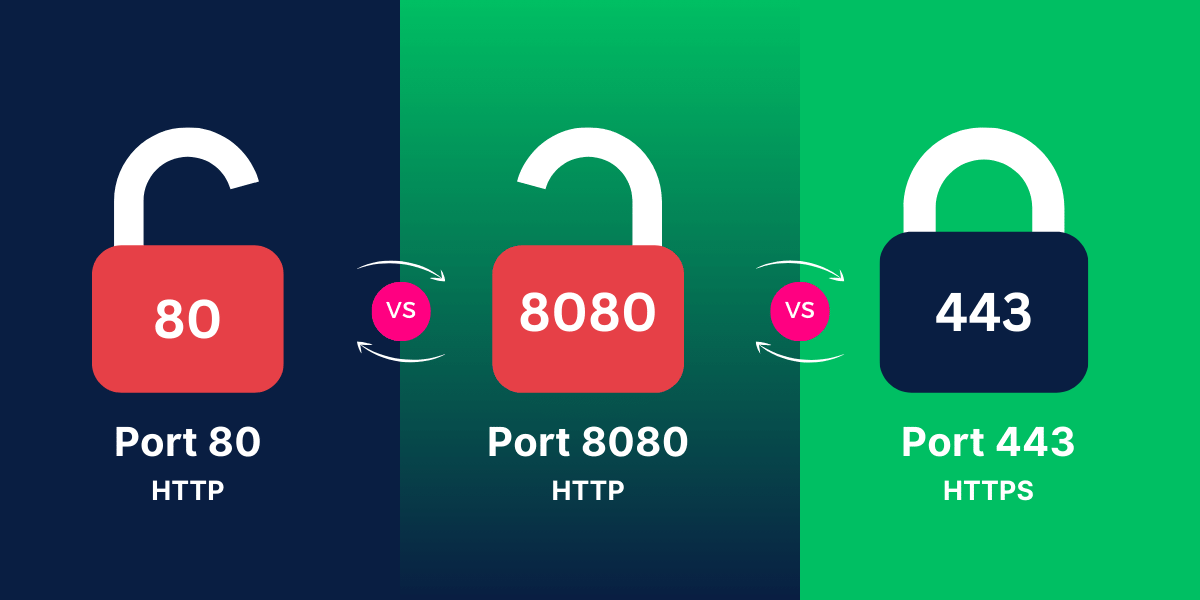
Port 80, port 8080, and port 443 are the three web ports every developer and sysadmin encounters, but each serves a distinct role. Port 80 vs 443 difference comes down to encryption: port 80 transmits data in plaintext; port 443 encrypts every byte using TLS before it leaves the server. Port 8080 belongs neither in production nor in the system port range - it sits in the user-registered range, used primarily for local development and reverse-proxy backends.
Choosing the wrong port does not just cause a connection error. It can expose user data, trigger browser security warnings, and measurably damage search rankings. This guide covers exactly what each port does, when to use it, and which one your production site must run on.
Port 80 vs 8080 vs 443: Quick Comparison
| Feature | Port 80 (HTTP) | Port 443 (HTTPS) | Port 8080 (Alt HTTP) |
| Protocol | HTTP (Plaintext) | HTTPS (TLS/SSL Encrypted) | HTTP (Plaintext / Proxy) |
| Encrypted? | No | Yes - TLS 1.2 / TLS 1.3 | No |
| IANA Port Range | System (0–1023) | System (0–1023) | User (1024–49151) |
| Primary Use | Legacy / Redirect only | All public websites | Dev, proxies, Tomcat, Jenkins |
| SEO Impact | Negative (Not Secure) | Positive (Google ranking signal) | N/A - dev / internal only |
| Browser Warning | Not Secure label (Chrome) | Padlock - trusted | Not Secure (if HTTP) |
| HTTP/2 Support | No | Yes (faster loading) | No |
| Firewall Status | Usually open | Always open | Often BLOCKED (corporate) |
| When NOT to use | Never serve real content | No exceptions for public sites | Never in production |
The table above gives the full picture. According to W3Techs usage statistics, over 88% of the top 10 million websites now default to HTTPS - meaning port 443 is the standard, not the upgrade. Sections below explain each port in depth: firewall behavior, security implications, SEO impact, and the exact scenarios where each port belongs.
What is port 80 and when is it still used?
Port 80 is the IANA-registered system port for HTTP traffic. When a browser connects to http://example.com with no port specified, it targets port 80 automatically. In the 0–1023 system range, binding to it requires root or administrator privileges on Unix-like systems.
In 2026, port 80 has exactly one legitimate job: issuing a 301 redirect to port 443. Serving actual content over port 80 is a security failure, not a configuration option. Chrome's "HTTPS-First" mode - scheduled to default on in Chrome 154 (October 2026) - will warn users before loading any HTTP page, making unencrypted port 80 content increasingly inaccessible to ordinary browsers.
Legitimate uses for port 80 today:
- 301 redirects to HTTPS on port 443 - the only safe use for public-facing servers
- HTTP-01 ACME challenge verification - Let's Encrypt uses port 80 briefly during SSL certificate issuance
- Isolated internal networks - where external exposure is deliberately absent and TLS overhead is avoided
- Legacy systems pre-HTTPS - these need a documented port 80 vs 443 upgrade path before 2026 browser changes take effect
What is port 8080 used for in development and proxies?
Port 8080 is a registered user port in the IANA 1024–49151 range. The number was chosen deliberately - "two 80s" - as a memorable alternative to port 80 when that port is blocked, occupied, or requires root access. Unlike ports 80 and 443, port 8080 carries no IANA protocol restriction: it can serve HTTP, act as a proxy relay, or run application servers like Apache Tomcat or Jenkins.
Most corporate firewalls block port 8080 on outbound traffic, which is precisely why it should never appear at the public edge of a production system. It belongs behind a TLS-terminating reverse proxy that accepts connections on port 443 and forwards them internally.
Most common port 8080 use cases:
- Local development servers - Django, Node.js, Spring Boot, and similar frameworks default to 8080 or 3000 to avoid root privilege requirements
- Apache Tomcat - defaults to port 8080 in standalone mode before a frontend proxy takes over
- Nginx or HAProxy backend - the reverse proxy listens on 443, decrypts TLS, then forwards to the application on port 8080
- Jenkins CI - defaults to 8080; placed behind an HTTPS proxy for any external access
- HTTP proxy listeners - enterprise routers and tunnels commonly expose proxy endpoints on 8080
In her analysis of web server configurations, Priya Mervana's work with SSL installation reviews across hundreds of server setups consistently shows that port 8080 exposure on public IPs is the most common staging-to-production migration error - the application works, but browsers flag it and search crawlers penalize it.
What is port 443 and why does HTTPS use it specifically?
Port 443 is the IANA-registered system port for HTTPS. Per RFC 9110, port 443 is formally designated for "HTTP over TLS/SSL." When a browser connects to https://example.com, it targets 443 automatically - no port specification in the URL is needed because the https:// scheme resolves to 443 by default.
The IANA assignment dates to RFC 1700 (1994). The number has no technical significance; it is simply the officially registered value that the internet standardized on. Port 443 requires a valid TLS certificate from a trusted Certificate Authority. Without one, browsers display a certificate error that terminates the session for most users.
What port 443 provides over 80 and 8080
- TLS encryption - all request and response data encrypted in transit; no plaintext exposure to ISPs or network monitors
- Server authentication - the TLS certificate proves server identity, blocking domain impersonation
- Browser trust signals - padlock icon, no "Not Secure" label, green address bar for EV certificates
- HTTP/2 and HTTP/3 access - both protocols are TLS-only in practice; port 80 and 8080 are locked to HTTP/1.1
- Firewall pass-through - nearly every corporate and residential firewall permits outbound 443; port 8080 is frequently blocked
Why is port 443 more secure than port 80?
Port 443 is more secure than port 80 because every byte passing through it is encrypted by TLS before transmission. Port 80 sends all data in plaintext - any device between browser and server (ISP, router, network monitor) can read or modify the content.
The TLS handshake establishes a shared session key during the initial connection, then uses symmetric encryption for all subsequent data. Port 80 performs none of this - it connects, requests, and delivers with no authentication and no encryption.
The practical security gap between port 80 and 443:
- Man-in-the-middle attacks - port 80 is fully exposed; port 443 requires breaking TLS to intercept data
- Packet inspection - ISPs can log all port 80 content; port 443 reveals only IP and domain
- Cookie theft - session cookies over port 80 are readable in transit; port 443 with the Secure cookie flag prevents this
- Content injection - port 80 traffic can be modified in transit (injected ads, embedded malware); port 443 prevents modification entirely
Does using port 8080 instead of 443 affect SEO?
Yes - running a public website on port 8080 instead of 443 measurably hurts SEO. Google confirmed HTTPS as a ranking signal in August 2014 via Google Search Central. Sites on port 8080 running unencrypted HTTP lose that signal entirely. Chrome's "Not Secure" warning for HTTP pages increases bounce rates, which sends negative quality signals back through Google's ranking systems.
The HTTPS vs HTTP security comparison covers the full technical difference. The SEO damage is broader than just the ranking signal:
- Loss of HTTPS ranking signal - confirmed lightweight but real boost; HTTP sites on port 8080 receive none
- "Not Secure" browser label - Chrome has shown this since 2018; users abandon HTTP sessions faster, raising bounce rate
- No HTTP/2 access - HTTP/1.1 on port 8080 means no request multiplexing; page load speed suffers
- Backlink reluctance - authoritative domains avoid linking to HTTP sites, weakening external link profile
- Analytics referral loss - HTTP-to-HTTPS traffic loses referrer data, distorting attribution in GA4
When should you use each port?
The right answer depends on environment - production, staging, or local development - and whether traffic is public or internal.
| Scenario | Correct Port | Reason |
| Public website | 443 (HTTPS) | Browser warning + SEO penalty on port 80 |
| Local dev server | 8080 or 3000 | Avoids root privilege requirement of port 80 |
| Reverse proxy backend | 8080 | Nginx/Apache fronts on 443; passes to backend on 8080 |
| Legacy HTTP redirect | 80 → 443 | 301 redirect only - never serve content on port 80 |
| Internal API testing | 8080 | No TLS cert needed; isolated from public traffic |
| API in production | 443 (HTTPS) | All production APIs serving real users must use TLS |
The rule: port 443 for anything user-facing, port 8080 for anything behind a proxy or running locally, port 80 only as the redirect that removes itself from the connection.

Priya Mervana
Web Security Expert, SSLInsights.com
"The port 8080 exposure problem appears in roughly one in five server audits I've reviewed. Teams test in staging where port 8080 works fine, then push to production without a proxy layer. The site goes live on HTTP, Chrome flags it immediately, and the SEO impact compounds for months before anyone connects it to the port configuration."
How do you check which port your server is listening on?
You can verify active listeners from the server command line or externally using an SSL checker. Both take under 60 seconds.
Option 1 - Server command line (Linux/macOS):
- Run ss -tlnp | grep -E '80|8080|443' to list all TCP listeners on those ports
- Or use netstat -tlnp | grep -E '80|8080|443' on older systems without the ss utility
- Review the output: each line shows port, process name, and PID
Option 2 - Check your Nginx / Apache config
- Open the SSL checker tool and enter the domain
- The tool tests port 443 by default; append :8080 to the domain to test that port explicitly
- A successful result confirms the port is open and TLS is configured correctly
Windows users run netstat -ano | findstr ":80 :8080 :443" at Command Prompt.
What are the most common port configuration mistakes?
Port-related failures most often come from mismatches between what the server listens on and what the firewall, proxy, or browser expects.
- Serving production content on port 8080 - the most common staging-to-production migration error; the site works but browsers warn users and crawlers penalize it
- Redirect loop between 80 and 443 - the server redirects port 80 to 443 but the SSL certificate is misconfigured, pushing traffic back indefinitely
- Port 443 open but no certificate installed - TLS handshake fails immediately; browsers show ERR_SSL_PROTOCOL_ERROR
- Firewall blocking port 8080 outbound - internal proxy works on LAN but is unreachable externally
- Mixed content after HTTPS migration - the main page loads on 443 but embedded assets still reference http:// URLs on port 80
- NAT port mismatch - external load balancer maps 443 to an internal 8080 backend, but the application listens on 8081, producing a 502 gateway error
PRACTITIONER'S NOTE
In over 10 years of reviewing SSL configurations, the single most avoidable production error is a server still answering on port 8080 without TLS. The migration path is straightforward: install a certificate, configure the server to listen on 443, set port 80 to issue a permanent 301, and verify with an external port scan. If you're behind a load balancer, confirm that the backend target group maps to the correct application port - a mismatch between 8080 and 8081 causes intermittent 502 errors that are notoriously difficult to diagnose under load. Run the SSL checker after every deployment, not just after initial setup.
– Priya Mervana | Web Security Expert, SSLInsights.com
Priya Mervana is a web security expert at SSLInsights.com with over 10 years of experience writing about SSL/TLS encryption, certificate infrastructure, and online privacy. She has reviewed hundreds of server configurations across shared hosting, VPS, and enterprise environments, and contributes to SSLInsights' free SSL toolset used by developers worldwide.
Frequently Asked Questions
Is port 8080 safe to use for a public website?
Port 8080 is not recommended for public websites. It typically runs unencrypted HTTP, transmitting data in plaintext. Browsers display a "Not Secure" warning for any site not using HTTPS on port 443. For public sites, port 8080 should only appear as an internal backend sitting behind an HTTPS reverse proxy - never at the public edge.
Why does HTTPS use port 443 specifically?
IANA formally assigned port 443 for HTTPS/SSL traffic in RFC 1700 (1994). Browsers and operating systems use this as the default for any https:// URL with no explicit port. The number has no technical significance - it is the officially registered value the internet standardized on.
Can I run HTTPS on port 8080 instead of 443?
Technically yes - you can configure TLS on any port, including 8080. Browsers will not recognize it automatically; users must type the full URL including port (e.g., https://example.com:8080). This is acceptable for internal tools but not for public websites, where the non-standard port breaks user expectations and is frequently blocked by corporate firewalls.
What happens if port 443 is closed on the server?
The browser fails to establish a TLS handshake and shows ERR_CONNECTION_REFUSED or a timeout. No HTTPS connection is possible without port 443 open on both the server firewall and the hosting provider's network security group. Opening port 443 is a prerequisite step in every SSL certificate installation guide.
Does port 80 still have any purpose in 2026?
Yes - but only as a redirect handler. Web servers should listen on port 80 specifically to issue a 301 redirect to the HTTPS equivalent on port 443. Let's Encrypt also uses port 80 for HTTP-01 domain validation during certificate issuance. Beyond those two functions, port 80 should serve no content on any public-facing site.
What port does HTTP/2 use?
HTTP/2 uses port 443 in all major browser implementations. While the HTTP/2 specification technically allows cleartext HTTP/2 (h2c), no major browser supports it in practice. Both HTTP/2 and HTTP/3 are HTTPS-only from the browser's perspective, making port 443 a prerequisite for modern protocol performance.
Next Step for Your Site
Port 443 is Ready.
Is Your SSL Certificate?
Port 443 requires a valid TLS certificate from a trusted CA. Without one, browsers block your visitors with a hard error. Get issued in minutes - no technical expertise needed.
- Trusted by all browsers
- Full certificate chain included
- HTTP/2 & HTTP/3 enabled
- Instant DV issuance
Starting from $7.95/yr