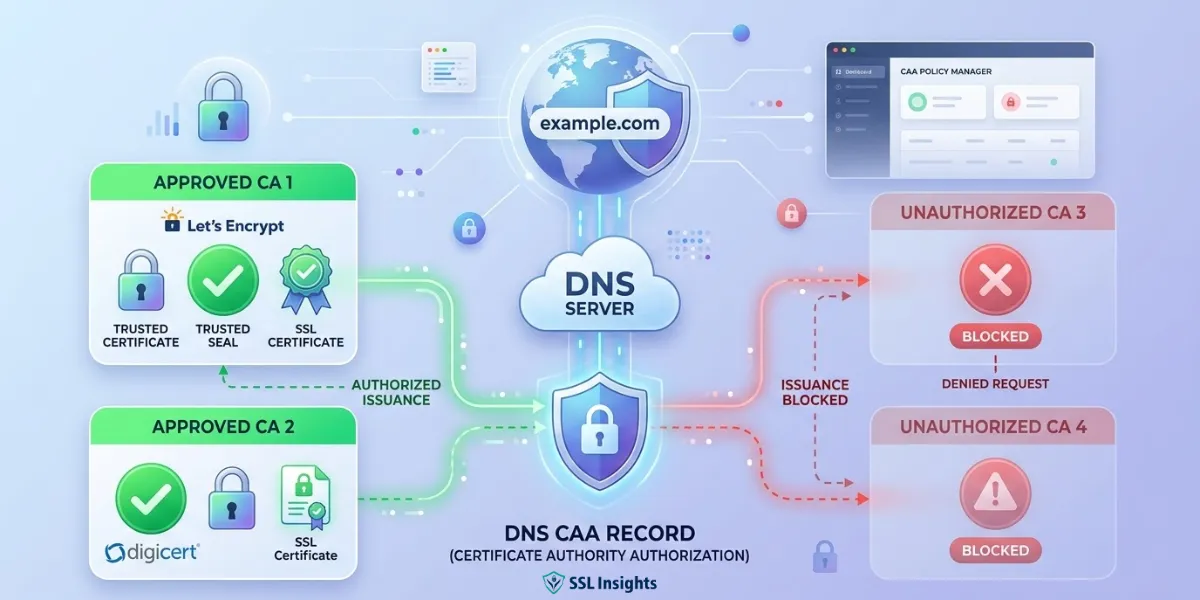
A DNS CAA record is a DNS resource record that lets domain owners specify which Certificate Authorities are authorized to issue SSL/TLS certificates for their domain. Every CA must check this record before issuing a certificate. Any CA not listed in the record must refuse the request - directly preventing unauthorized certificate issuance at the DNS level, before it occurs.
What Is a DNS CAA Record?
A certificate authority authorization record (DNS type 257) gives domain owners direct control over which Certificate Authorities can issue SSL/TLS certificates for their domain. Without one, any publicly trusted CA - and there are hundreds - can issue a certificate for your domain, provided they verify domain control.
That open-by-default behaviour creates measurable risk. As of January 2025, more than 86% of all websites load over HTTPS according to W3Techs HTTPS adoption data - yet only 15.4% of the 150,000 most popular TLS-supporting websites had CAA records as of June 2024, according to Qualys SSL analysis data. This gap means millions of HTTPS sites remain exposed to mis-issuance risk.
SSL Insights recommends setting CAA records as a baseline security step for every domain that uses HTTPS.
How CAA Records Prevent Unauthorized Certificate Issuance
CAA records prevent SSL certificate mis-issuance by requiring every CA to check the domain's DNS before proceeding. This check happens at the issuance stage - before the certificate is created, not after. Other mechanisms like Certificate Transparency detect mis-issuance only after the fact.
Understanding the domain control validation methods a CA uses helps clarify where CAA fits - it acts as a gate that runs before any validation begins. Here is how the process works:
- A domain owner publishes a CAA record in DNS listing authorized CAs.
- A CA receives a certificate issuance request for that domain.
- The CA queries DNS for the domain's CAA record.
- If the CA finds a CAA record and is not listed, it must refuse issuance.
- If no CAA record exists, any CA may proceed with its normal validation checks.
According to RFC 8659: DNS Certification Authority Authorization (IETF, November 2019), the current authoritative standard, conformance with a published CAA record is a necessary condition for certificate issuance. All CAs have been required to check CAA records since September 8, 2017, following the CA/Browser Forum Ballot 187.
CAA Record Tags: issue, issuewild, and iodef
Each CAA record contains a flag, a tag, and a value. The flag is set to 0 for standard use. The CAA record tags define the type of rule being applied. There are three standard tags:
| Tag | What It Controls | Example Value |
| issue | Authorizes a CA to issue any certificate type for the domain | "letsencrypt.org" |
| issuewild | Authorizes a CA to issue wildcard certificates only | "digicert.com" |
| iodef | Sends violation reports to your team when unauthorized requests occur | "mailto:security@yourdomain.com" |
The issuewild DNS record tag takes precedence over the issue tag for wildcard requests. You can restrict wildcard issuance to a single CA while allowing multiple CAs to issue standard certificates.
The iodef tag CAA entry does not block issuance - it only defines where violation reports go. Not all CAs send these reports, so iodef should complement other monitoring tools rather than replace them.
How CAA Records Apply to Subdomains
CAA records use hierarchical inheritance. A CAA record for subdomains is automatic - any record set on your root domain covers all subdomains beneath it.
For example, a CAA record on example.com automatically applies to:
- www.example.com
- blog.example.com
- shop.example.com
- Any other subdomain under example.com
However, you can override this inheritance. Adding a specific CAA record directly on blog.example.com means that record governs blog.example.com, while the root record continues to govern all other subdomains. This flexibility lets teams assign different CAs to different parts of their infrastructure.
How to Add a CAA Record to Your Domain
Setting up a CAA record takes under five minutes in most DNS management consoles. SSL Insights provides a free CAA record generator tool to build the correct syntax automatically. To add one manually, follow these steps:
- Log in to your DNS provider or domain registrar dashboard.
- Navigate to DNS management and select "Add Record."
- Set the record type to CAA.
- Set the flag to 0.
- Choose the tag: issue for standard certificates, issuewild for wildcard certificates, or iodef for violation reporting.
- Enter the CA domain name as the value in quotation marks - for example, "letsencrypt.org" or "sectigo.com".
- Save the record. Allow up to 48 hours for DNS propagation to complete globally.
To verify your CAA record is live, run this command:
dig CAA yourdomain.com +short
A successful response returns the CAA record entry. No response means no CAA record is currently set for your domain.
CAA Records vs Certificate Transparency: Key Differences
CAA records and Certificate Transparency both address certificate mis-issuance, but at different stages. Understanding their roles prevents the common mistake of treating them as alternatives rather than complements.
| Mechanism | Stage | Function |
| CAA Record | Before issuance | Prevents unauthorized CAs from issuing certificates |
| Certificate Transparency | After issuance | Logs all issued certificates publicly for audit |
| DANE / TLSA Record | At connection | Pins expected certificate fingerprints at DNS level |
Because CAA acts before issuance and Certificate Transparency acts after, using both together gives layered protection. CAA blocks unauthorized requests. CT detects any certificates that slip through due to CA error or non-compliance, creating a public audit trail.
Frequently Asked Questions About DNS CAA Records
What is a DNS CAA record?
A DNS CAA record is a DNS resource record that lets domain owners specify which Certificate Authorities are permitted to issue SSL/TLS certificates for their domain. Any CA not listed in the record is required to refuse certificate issuance for that domain.
How do CAA records prevent unauthorized certificate issuance?
CAA records prevent unauthorized certificate issuance by requiring every CA to check the domain's DNS before issuing a certificate. This check happens before issuance - making CAA a proactive security measure. If a CA is not listed in the CAA record, it must refuse the request, regardless of whether other validation checks pass.
Are CAA records mandatory?
CAA records are not mandatory for domain owners, but checking them is mandatory for all Certificate Authorities since September 8, 2017. Domain owners who do not set a CAA record allow any CA to issue certificates for their domain by default. Setting one is strongly recommended for any domain using HTTPS.
What are the main CAA record tags?
The three standard CAA record tags are: issue (authorizes a CA to issue any certificate type), issuewild (authorizes wildcard certificate issuance only), and iodef (specifies an email or URL where CAs should send reports of unauthorized issuance attempts).
Do CAA records apply to subdomains?
Yes. CAA records are inherited by all subdomains automatically. A CAA record set on example.com applies to www.example.com, blog.example.com, and every other subdomain, unless you set a more specific CAA record directly on a subdomain to override it.
How do I add a CAA record to my domain?
Log in to your DNS provider or domain registrar, go to DNS management, and add a new CAA record. Set the flag to 0, choose the tag (issue, issuewild, or iodef), and enter the CA domain name in quotes as the value. Save the record. DNS propagation typically completes within 24 to 48 hours.

Priya Mervana
 Verified Web Security Experts

Priya Mervana is working at SSLInsights.com as a web security expert with over 10 years of experience writing about encryption, SSL certificates, and online privacy. She aims to make complex security topics easily understandable for everyday internet users.