
Buy a Microsoft Authenticode Code Signing Certificate
Stop the SmartScreen Warning. Sign Your Windows Software.
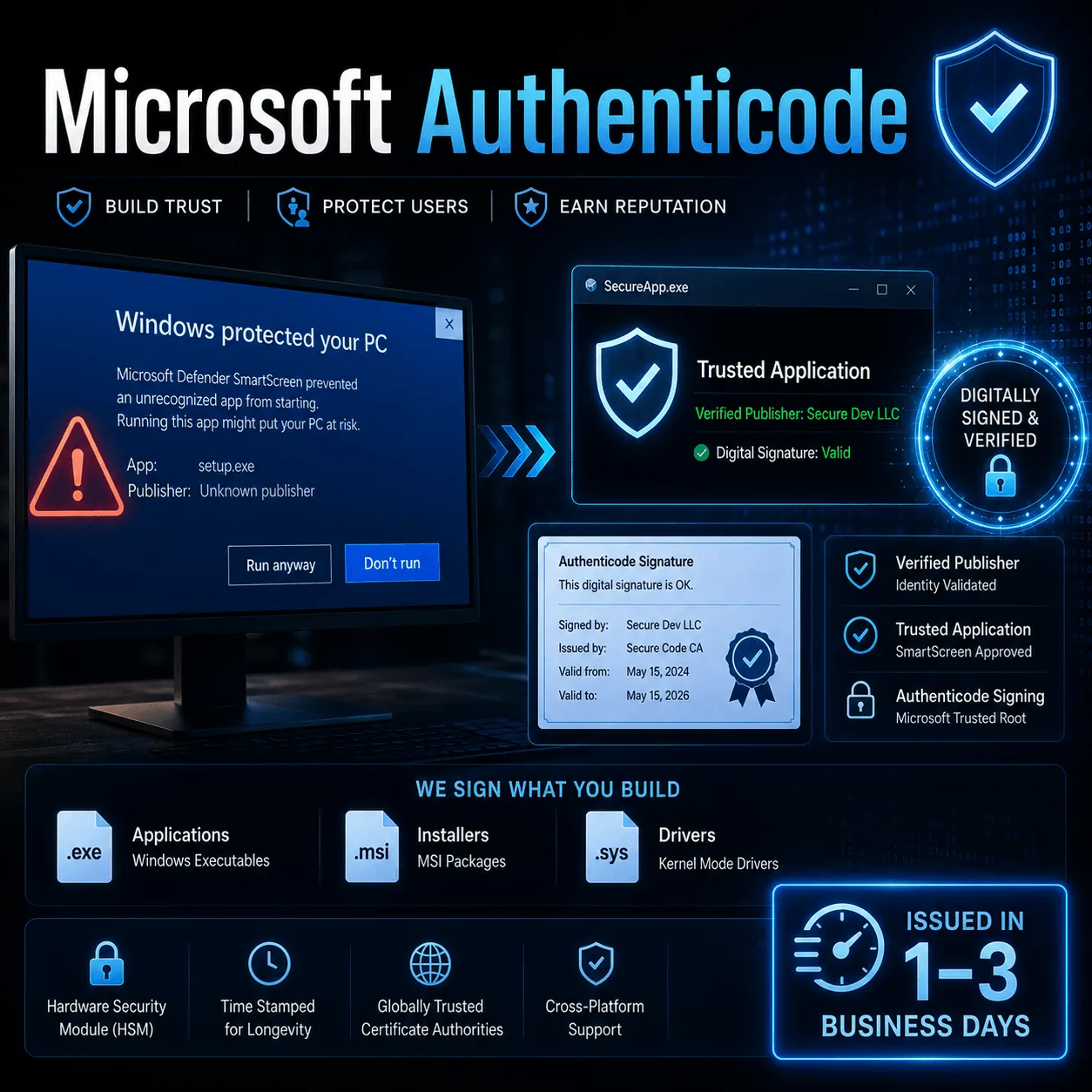
A Microsoft Authenticode Code Signing Certificate attaches your verified organization identity to every Windows executable, installer, and driver you ship. No more "Unknown Publisher." No more SmartScreen blocks on download.
- Issued in 1–5 business days
- Microsoft Trusted Root CAs only
- SHA-256 + RFC 3161 timestamp
- OV & EV options available
Pricing & Options
Choose Your Authenticode Certificate
All certificates below are issued by members of the Microsoft Trusted Root Program and produce a valid Authenticode signature recognized on Windows 7 through Windows 11.


Sectigo Code Signing Certificate
$219.45/yr
OV Code Signing
Displays Verified Publisher Name
Removes Unknown Publisher Warnings

DigiCert Code Signing Certificate
$409.02/yr
Displays Verified Publisher Name
FIPS-140-2 USB Token
Removes Unknown Publisher Warnings


$288.20/yr
EV Code Signing
USB Token Storage
Verified Publisher’s Identity
DigiCert EV Code Signing Certificate
$576.35/yr
Issued in 0-3 Days
Unlimited Software Signing
Publisher Identity Vetting
How It Works
What Is a Microsoft Authenticode Code Signing Certificate?
A Microsoft Authenticode certificate uses public key infrastructure (PKI) to attach your organization's verified identity to the cryptographic hash of your software. When a user downloads or runs your file, Windows checks the signature against the CA's root certificate embedded in the OS.
If the signature is valid and the file is unaltered, Windows displays your publisher name in the UAC dialog and on the download. If the signature is missing, broken, or from an untrusted CA, Windows blocks execution or triggers a SmartScreen warning page.
Signing uses signtool.exe from the Windows SDK with a SHA-256 digest and an RFC 3161 compliant timestamp server. The Microsoft Trusted Root Program lists over 60 approved root CAs as of May 2026 — only certificates from these CAs produce a trusted Authenticode signature on Windows.
Always include a timestamp. Without an RFC 3161 timestamp, your signed files will show an error once the certificate expires - even for releases distributed while the certificate was valid.
Cryptographic Integrity
Authenticode computes a SHA-256 hash of your file and encrypts it with your private key. Any post-signing change breaks the hash - Windows raises an immediate tamper alert visible to the end user.
Verified Publisher Identity
The CA verifies your organization against government business registries before issuing. Your legal company name appears in the Windows security dialog - not "Unknown Publisher."
RFC 3161 Trusted Timestamp
A trusted timestamp proves the signature existed while the certificate was valid. Signed files remain trusted long after certificate expiry - provided the timestamp was applied at signing time.
OV vs EV
Standard vs. Extended Validation: Full Comparison
Both types produce a valid Authenticode signature. The difference lies in validation depth, SmartScreen behavior, and how the private key must be stored.
| Feature | OV - Standard | EV - Extended Validation |
|---|---|---|
| Validation depth | Organization identity check against business registries | Full EV vetting per CA/Browser Forum EV Guidelines v1.7, including QGIS & legal opinion letter |
| Issuance time | 1–3 business days | 3–5 business days + hardware token shipping (2–7 days) |
| Removes "Unknown Publisher" | Yes | Yes |
| Instant SmartScreen reputation | Builds with download volume over time | Granted by Microsoft immediately on first use |
| Private key storage | Software keystore (HSM optional) | FIPS 140-2 Level 2 hardware USB token - non-exportable, mandatory |
| Kernel-mode driver signing | Not supported | Supported for Windows 10/11 x64 drivers |
| MSIX / Microsoft Store | Not supported | Meets Microsoft Store submission requirements |
| Typical annual price | $50–$200 / year | $250–$500 / year |
| Best for | Established publishers with existing SmartScreen reputation and download history | New publishers, driver developers, enterprises, high-volume distribution |
Supported File Types
What File Types Does Authenticode Sign?
Authenticode covers the Windows Portable Executable (PE) format and several scripting formats natively recognized by Windows. All signing uses signtool.exe from the Windows SDK.
.exe
Windows Executable
.msi
Windows Installer
.dll
Dynamic Link Library
.sys
Kernel Driver (EV only)
.cat
Security Catalog
.cab
Cabinet Archive
.ocx
ActiveX Control
.ps1
PowerShell Script
.psm1
PowerShell Module
.appx
AppX Package
.msix
MSIX (Store)
.xap
Silverlight Package
Step-by-Step
How to Buy and Activate Your Authenticode Certificate
From purchase to your first signed file in 6 steps. EV buyers should allow additional time for hardware token delivery.
01. Step One
Choose OV or EV
New publisher or signing drivers? Choose EV for instant SmartScreen reputation. Established publisher with a download history? OV is sufficient and issues faster.
02. Step Two
Generate a CSR
Create a 2048-bit RSA (or 256-bit ECC) key pair and submit the CSR to your CA. Use the free SSLInsights CSR Generator to simplify this step.
03. Step Three
Submit Business Documents
OV: business registration + phone call. EV: the CA additionally verifies against QGIS sources (Dun & Bradstreet, GLEIF) and may require a legal opinion letter.
04. Step Four
Receive Your Certificate
OV: download a PFX/P12 file. EV: the CA ships a FIPS 140-2 Level 2 USB hardware token (YubiKey or SafeNet eToken) with the private key pre-loaded and non-exportable.
05. Step Five
Sign with signtool.exe
Run: signtool sign /fd SHA256 /tr http://timestamp.sectigo.com /td SHA256 /f cert.pfx yourapp.exe. Always include a timestamping authority URL.
06. Step Six
Verify the Signature
Run signtool verify /pa yourapp.exe and check File → Properties → Digital Signatures in Windows Explorer to confirm your publisher name and certificate chain.
Why It Matters
What Happens Without an Authenticode Certificate?
Unsigned Windows software faces four compounding problems that directly affect user trust, adoption, and revenue.
SmartScreen Block Screen
Windows displays "Windows protected your PC" with "Don't run" as the prominent button. According toMicrosoft Security Blog data (December 2021), SmartScreen processes 130+ billion file and URL requests per month. Unsigned files face this screen on every download.
Unknown Publisher Warning
Every installer and executable triggers a UAC prompt showing "Unknown Publisher" in a yellow warning banner. Users trained to reject unknown publishers will decline the installation - regardless of how legitimate your software is.
Kernel Driver Blocked at OS Level
On 64-bit Windows 10 and Windows 11, unsigned kernel-mode drivers are blocked by default. Microsoft enforces Kernel-Mode Code Signing (KMCS) across all modern Windows builds since Vista x64 - there is no production workaround without a valid EV certificate.
Conversion Rate Impact
A SmartScreen block or "Unknown Publisher" dialog is the last touchpoint before a user decides whether to trust your software. For any commercial Windows product, eliminating these warnings is the highest-return improvement available in your distribution funnel.
FAQ
Frequently Asked Questions
The most common questions about Microsoft Authenticode code signing certificates, answered directly.
What is a Microsoft Authenticode code signing certificate?
A Microsoft Authenticode code signing certificate is a PKI credential issued by a CA in the Microsoft Trusted Root Program. It lets software publishers digitally sign Windows executables, installers, drivers, and scripts. The signature proves the software came from a verified publisher and has not been altered since signing. Windows verifies the signature at both download and execution time using the CA's root certificate embedded in the operating system.
Does an Authenticode certificate remove the SmartScreen warning?
EV Authenticode certificates remove the SmartScreen warning immediately on first use - Microsoft grants instant reputation to EV-signed files. OV certificates do eliminate the "Unknown Publisher" dialog, but SmartScreen may still display a warning until the file accumulates sufficient download history. For new publishers, EV is the correct choice to avoid SmartScreen warnings from day one.
How long does it take to get an Authenticode certificate?
OV certificates are typically issued within 1–3 business days after the CA completes organization verification. EV certificates take 3–5 business days due to stricter vetting. EV buyers must also account for hardware USB token shipping time - typically 5–7 business days standard or 2–3 days express from most CAs.
Can an individual (not a registered company) buy an Authenticode certificate?
Authenticode code signing certificates require OV or EV validation, both of which verify a legal business entity. Sole traders and self-employed individuals registered as a legal business can qualify. Personal individuals without a registered business entity cannot obtain an OV or EV code signing certificate under the CA/Browser Forum Baseline Requirements for Code Signing Certificates (version 3.3, effective 2023).
Do I need a separate certificate for each application I sign?
No. One Authenticode certificate can sign an unlimited number of files during its validity period. The certificate identifies your organization, not individual applications. You can use the same certificate to sign multiple products, versions, and file types - provided all software is legitimately distributed by your verified organization.
What happens to previously signed files when my certificate expires?
Previously signed files remain trusted indefinitely, provided you applied a trusted RFC 3161 timestamp at the time of signing. The timestamp proves the signature existed while the certificate was valid. Without a timestamp, the signature becomes untrusted once the certificate expires - Windows will display an error for those files even if they were signed correctly.
How long is an Authenticode certificate valid?
As of June 1, 2023, the CA/Browser Forum reduced the maximum validity period for code signing certificates to 398 days (approximately 13 months), down from the previous 39-month maximum. Annual renewal is now standard. Files signed before expiry retain a valid trusted signature indefinitely - provided RFC 3161 timestamping was used at signing time.
Microsoft Authenticode
Stop the SmartScreen warning today
An EV code signing certificate gives you instant SmartScreen
reputation on first use - no download history required.
Issued in 1–5 days || SHA-256 + timestamp || FIPS 140-2 token || All Windows versions